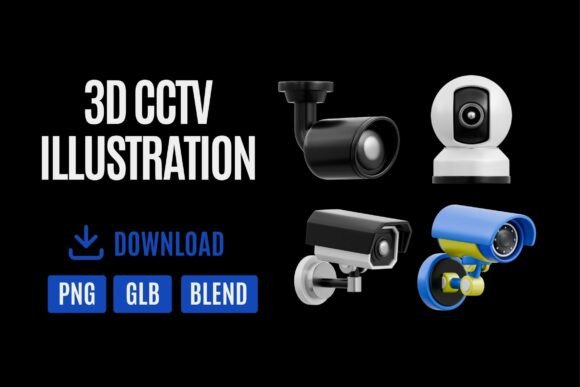
3D Icon CCTV & Security Camera Set 03: Elevate Your Digital Projects
In the crowded landscape of digital design, finding assets that convey both cutting-edge technology and professional polish can be a challenge. The 3D Icon CCTV & Security Camera Set 03 is a premium collection designed to meet this exact need. It offers a suite of high-quality, realistic 3D security camera models, meticulously crafted with smooth shading and modern aesthetics. This isn't just another set of flat icons; it's a toolkit for injecting a sense of trust, innovation, and sophisticated surveillance into your visual projects.
Imagine presenting a new smart home interface, pitching a security startup's branding, or designing a sleek tech-focused website. Standard 2D icons often fall short of conveying the tangible, hardware-centric reality of security technology. This is where the 3D Icon CCTV & Security Camera Set 03 excels. Each model possesses a distinct personality—weighty, authoritative, and technologically advanced. The smooth, realistic materials and thoughtful lighting baked into the assets create an immediate sense of depth and credibility. They don't just represent security cameras; they embody the concept of modern, reliable monitoring.
Practical Applications: From Presentations to Prototyping
The true value of any design asset lies in its versatility and how seamlessly it integrates into a workflow. The 3D Icon CCTV & Security Camera Set 03 is delivered in three crucial formats: transparent PNGs, GLB, and BLEND. This triad addresses nearly every professional scenario.
- For Rapid Prototyping & Web Design: The transparent PNGs are a lifesaver. Drag and drop them directly into Figma, Canva, Adobe XD, or any web design mockup. They are perfect for creating realistic UI elements for security dashboards, smart home apps, or monitoring software interfaces, instantly elevating the fidelity of your prototype.
- For Dynamic Motion Graphics & Video: The GLB format is your gateway to animation. Import these models into software like Blender, Unreal Engine, or even some advanced video editors to create animated sequences, rotating product showcases, or immersive 3D scenes for motion graphics and promotional videos.
- For Full Creative Control & Customization: The native BLEND files offer unlimited potential. Adjust materials, tweak lighting, change camera angles, and render completely custom visuals. This is ideal for crafting unique brand identity elements, bespoke packaging design for tech products, or high-resolution print materials where off-the-shelf assets won't suffice.
Think beyond the obvious. A marketing agency could use these assets to create compelling visuals for a blog post on "The Future of Home Security." A tech startup might integrate a subtle, animated camera into their app's onboarding sequence to symbolize safety. A content creator could use a rendered still as a sophisticated thumbnail for a video review on surveillance tech. The applications span from commercial to personal projects, always adding a layer of professionalism.
Influencing Perception and Brand Identity
Visual assets do more than decorate; they communicate. The choice of a modern typography font sets a tone, and similarly, the choice of 3D icons shapes brand perception. Using the 3D Icon CCTV & Security Camera Set 03 signals that a brand or project is forward-thinking, detail-oriented, and serious about technology.
Consider the psychology at play. The sleek, metallic finishes and precise engineering look of these cameras convey reliability and advanced capability. They create visual hierarchy in a design, drawing the eye to key features or calls-to-action related to security and monitoring. In a logo design or as part of a broader brand identity system for a security firm, these icons can become recognizable symbols of the company's core service, enhancing brand recognition and audience engagement through consistent, high-quality visuals.
Integrating the Set Into Your Creative Workflow
Adopting a new set of assets should be a thoughtful process, not just an impulse download. Here’s how to practically evaluate and use the 3D Icon CCTV & Security Camera Set 03:
- Evaluate the Aesthetic Fit: Does your project's visual language align with the modern, slightly technical style of these icons? They pair exceptionally well with clean sans serif font families, minimalist layouts, and color palettes that include metallic greys, blues, and stark whites or blacks. They might clash with overly rustic, handwritten, or vintage-inspired designs.
- Test with Your Existing Assets: Before committing, create a quick mockup. Place a PNG icon next to your project's primary typeface and color scheme. Does it feel integrated? The goal is cohesion, not a jarring addition. See how it interacts with other elements in your editorial design or UI layout.
- Leverage the Format Variety: Don't just use the PNGs because they're easy. If you have the skills or resources, the BLEND files are a goldmine. Customizing a render for a hero image on a website can set you apart from competitors who rely on the same stock visuals. This is where you move from using assets to crafting a unique visual language.
- Understand the Licensing: As with any commercial font or asset pack, review the license. This set is designed for professional use, but confirming its allowances for client work, merchandise, or digital products is a crucial step in any responsible creative process.
The 3D Icon CCTV & Security Camera Set 03 is more than a collection of 3D models; it's a strategic tool. It solves a specific visual problem—how to represent modern security technology with the depth and realism it deserves. By understanding its strengths, from the quick utility of PNGs to the creative freedom of BLEND files, designers, entrepreneurs, and creators can make informed decisions that enhance the clarity, professionalism, and impact of their work.